 Little Gift List
How to Share a Wishlist With Family and Friends
Sharing a wishlist can help somebody choose a present you will enjoy without needing a long conversation about what you want. But sharing a list does not have to mean making your wishes visible to everybody.
Before sending anything, decide who you want to see the list, what information they need and how you would like purchases to remain a surprise. Little Gift List uses private invitations rather than a publicly searchable personal wishlist.
In this article
Prepare your list before inviting somebody
Open My Wishlist in your Little Gift List account. Check that your ideas still suit you and remove anything you no longer want. Include useful product details such as size, colour or edition where they matter.
Give buyers a choice of price ranges. Saved prices can change, so ask them to check the retailer's current price and availability before buying.
If you are still collecting ideas, our multi-shop wishlist article explains how to keep product information together.
Create an individual private invitation
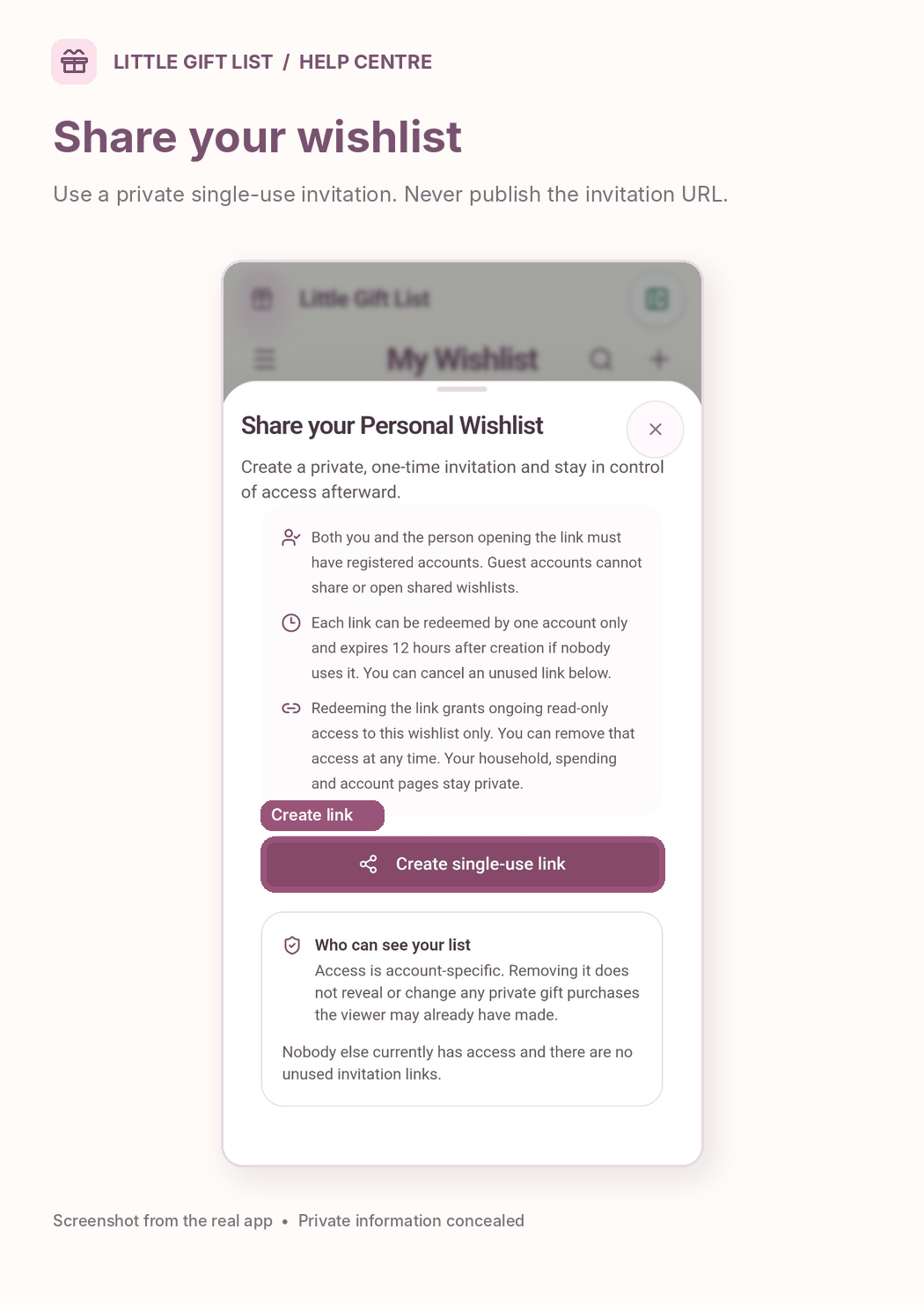
Open Share in My Wishlist and create an invitation for the person you want to invite. Each link is intended for one registered account and expires after 12 hours if unused.
Send the invitation privately to the intended person. Avoid posting it to a public social media feed or forwarding one invitation to an entire family group. If you want several people to see your wishlist, create a separate invitation for each of them.
The invited person needs a registered Little Gift List account to accept access. If an unused link expires, create a fresh invitation for that person rather than sharing an old link repeatedly.
Understand what the invited viewer can see
An accepted invitation gives that registered person access to view your personal wishlist. They can manually mark an item as bought to help coordinate purchases with other invited viewers.
Your own wishlist does not show those purchase markings, so the surprise is protected. The invitation is not permission to access your unrelated private gift buying plans.
The purchase itself takes place with the retailer. Little Gift List does not process the gift purchase or automatically confirm that a parcel has been delivered.
Share your wishes without creating pressure
A message can make clear that the list is only for inspiration. For example, you might say that you have saved a few things you like, but there is absolutely no expectation to buy anything.
If someone asks for ideas on behalf of another person, consider whether that person has permission to view the list. Create the appropriate invitation instead of passing around a link intended for someone else.
Manage access afterwards
You can remove a person's access through wishlist sharing controls when you no longer want them to see the list. Reviewing access is particularly useful when an occasion is over or your preferences have changed.
Our Help Centre sharing guide explains the app-specific steps. For advice on coordinating gifts between several buyers, see how to avoid duplicate gifts.
Frequently asked questions
Can anyone with the link view my wishlist?
No. A private invitation is intended for one registered account and must be accepted.
How long does an invitation last?
An unused invitation expires after 12 hours. Accepted access continues until you remove it.
Can I invite more than one person?
Yes. Create separate private invitations for each person you want to invite.
Can I stop sharing my wishlist later?
Yes. You can manage and remove access through the sharing controls.
Share when it feels right ♡
A wishlist is yours to manage. Collect ideas for yourself and invite people only when you are comfortable sharing them. It is perfectly fine to keep your wishes private until somebody asks.